Stop Drowning in Content: The Solo Creator's 2026 Dilemma
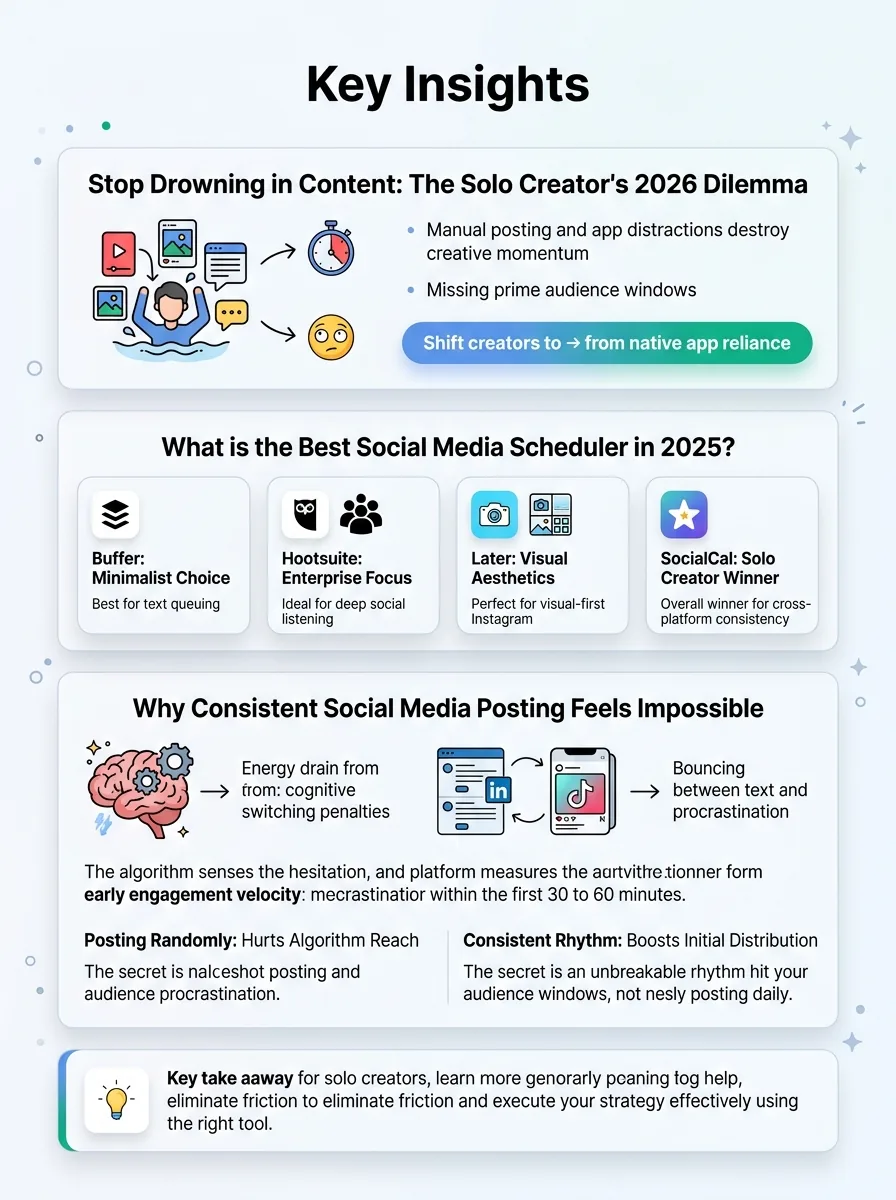
You spend an hour writing a brilliant post. You open the native app to publish it, get distracted by a looping short-form video, and suddenly forty minutes are gone. By the time you actually hit publish, you've missed your prime audience window and your focus is completely shot. Manual posting isn't just inefficient. It actively destroys your creative momentum.
Jump to a section:
- Stop Drowning in Content: The Solo Creator's 2026 Dilemma
- What is the Best Social Media Scheduler in 2025?
- Why Consistent Social Media Posting Feels Impossible
- 1. Buffer: The Minimalist's Choice for Queue-Based Posting
- 2. Hootsuite: The Enterprise Heavyweight
- 3. Later: The Visual-First Aesthetic Planner
- 4. SocialCal: The Streamlined Engine for Consistency
- Why Most People Still Get Bad Results (Even With Premium Tools)
- Real Creator Examples: Tool Stack Transformations
- The Consistency Bridge: Why Algorithms Reward Habits Over Hacks
- Frequently Asked Questions About Social Schedulers
- Final Verdict: Choosing the Right Engine for Your Growth
Most creators assume this is just part of the job. It isn't.
Ready to save 15+ hours every week?
Join other creators who've automated their social media with SocialCal.
Get started freeRelying on native apps traps you in an exhausting cycle of reactive behavior. You end up posting whenever you remember, rather than when the algorithm actually wants your content. This erratic rhythm kills your reach before your post even has a chance. If you are exhausted from trying to maintain a presence across X, LinkedIn, and short-form platforms manually, finding the best social media scheduler 2025 has to offer is not about getting more features. It is about eliminating friction. Instead of hunting for fragmented advice on how to save 15+ hours every week on social media, you just need the right vehicle to execute your strategy.
What is the Best Social Media Scheduler in 2025?
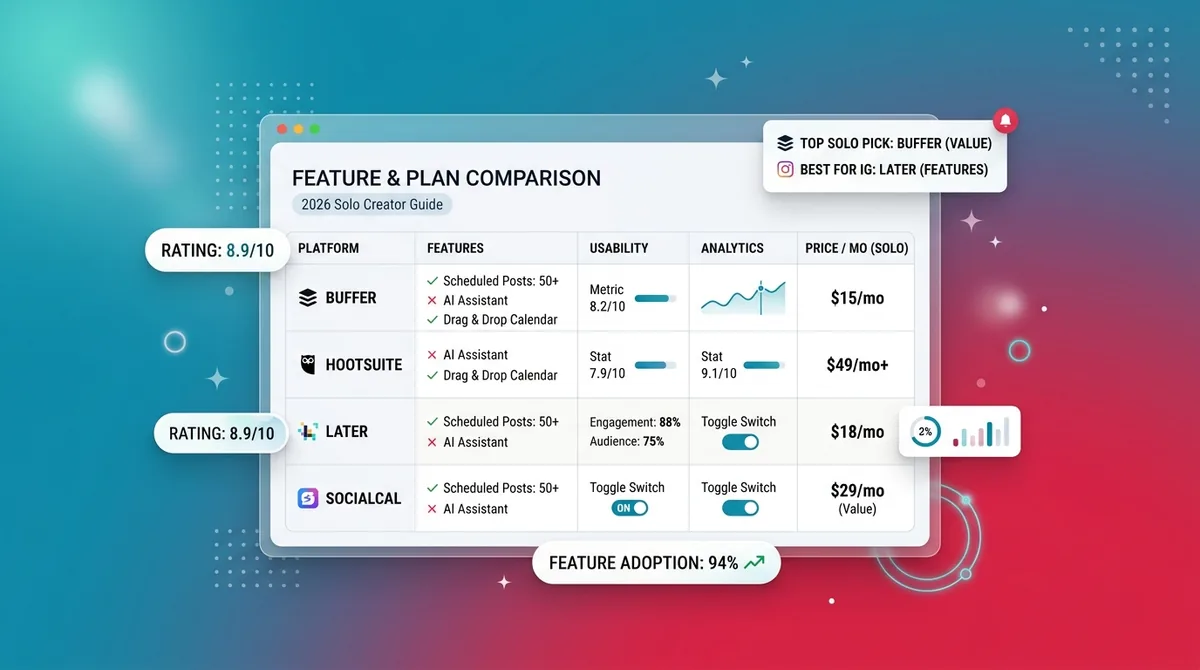
The best social media scheduler in 2025 depends entirely on your specific workflow. Buffer is ideal for minimalist text queuing. Hootsuite suits massive enterprise teams needing deep social listening. Later is perfect for visual-first Instagram aesthetics. SocialCal is the overall winner for solo creators because it drives cross-platform consistency without the expensive legacy bloat.
Why Consistent Social Media Posting Feels Impossible
The reason you fail to post consistently has nothing to do with willpower. It is a behavioral issue driven by cognitive switching penalties.
Every time you bounce between a text-heavy interface like LinkedIn and a hyper-visual feed like TikTok, your brain expends energy adjusting to the new environment. Do this three times a day, and you naturally build subconscious resistance to the act of posting. You start procrastinating.
The algorithm senses this hesitation. Social platforms measure early engagement velocity—the volume of interaction a post gets in its first 30 to 60 minutes. If you post randomly, the algorithm cannot predict your behavior and fails to prime your audience. Consistent posting trains the machine to expect activity from your account at specific times, which boosts initial distribution. You don't necessarily need to post every single day, but you do need an unbreakable rhythm. Understanding the secret to Instagram growth without posting daily relies entirely on hitting these specific audience activity windows consistently.
1. Buffer: The Minimalist's Choice for Queue-Based Posting
Buffer built its reputation on a simple, effective mechanism: the queue. Instead of picking a specific date and time for every single piece of content, you create a predefined weekly schedule.
You tell the system you want to post at 9 AM and 2 PM every weekday. Then, you just drop draft posts into your queue, and Buffer automatically slots them into the next available opening. This is brilliant for batching text-based content. Imagine sitting down on a Sunday, writing ten observations about your industry, and dropping them into a queue. Your X and LinkedIn feeds are now populated for the entire week.
Action Step: Check your platform analytics to find your two highest-engagement hours. Set those as your default queue slots, then spend 20 minutes filling those slots with text-based drafts.
Where Buffer Excels (and Falls Short) for Solo Creators
The clean, distraction-free UI is a massive win. It removes the visual noise that triggers procrastination.
But the reality of 2026 is that purely text-based strategies rarely survive alone. When you try to scale into short-form video across YouTube Shorts or TikTok, Buffer's simplicity becomes a bottleneck. The free tier is notoriously restrictive, and the analytics lack the depth needed to truly understand video retention metrics. If you are just expanding your text-based strategy and learning the complete guide to posting on Threads and Bluesky in 2026, a simple queue is a great starting point, but you will likely outgrow it.
2. Hootsuite: The Enterprise Heavyweight
Hootsuite operates on a stream-based dashboard mechanism. Rather than just a calendar, your screen is divided into vertical columns displaying incoming mentions, hashtag feeds, competitor posts, and your own scheduled content side-by-side.
This is incredibly effective for competitive social listening. If you run a customer service team for a mid-sized airline, you need to see every angry tweet containing your brand name the second it goes live. You can set up a stream specifically tracking your brand name alongside a stream tracking a competitor's hashtag, allowing rapid response to industry trends.
Action Step: If you use a stream-based tool, create a dedicated column tracking mentions of your three biggest competitors to see what customer complaints they are ignoring.
The Reality of Legacy Pricing for Solopreneurs
Solo creators do not need an airline's customer service dashboard.
Hootsuite was built for massive marketing departments. For an individual creator, this creates severe cognitive overload. When you log in just to schedule a Tuesday LinkedIn post, you are bombarded with four different data streams and complex team-assignment features. This visual friction breaks the habit loop. Furthermore, you end up paying premium legacy prices for team collaboration features you will never touch. It is like buying a commercial tractor to mow a small suburban lawn.
3. Later: The Visual-First Aesthetic Planner
Later approaches scheduling from the opposite direction of Buffer. It is fundamentally visual, built around the mechanics of grid planning.
The core interface allows you to drag and drop images and videos into a mock-up of an Instagram profile. This lets you visually balance your content—ensuring you don't place three text-heavy quote graphics right next to each other. For a fitness creator or an interior designer, this visual cohesion is a core part of their brand identity.
Action Step: Centralize your media first. Upload all your raw photos and video clips into a single media library folder before you even attempt to write captions or assign dates.
Maximizing the Grid-First Workflow
This aesthetic focus is fantastic for highly visual niches. But it introduces massive friction if you also post to text-heavy platforms.
Trying to schedule a long-form text thread or a native PDF document through a tool built for photos always feels clunky. If your goal is just to preview your Instagram aesthetic before posting natively, you are often better off using a free Social Media Grid Planner rather than paying a monthly subscription for features that don't translate well to your X or LinkedIn strategies.
4. SocialCal: The Streamlined Engine for Consistency
SocialCal was engineered specifically for the solo creator who needs to be everywhere without actually being everywhere.
It ditches the enterprise bloat and focuses entirely on the mechanics of multi-platform execution. The interface uses intuitive calendar blocking. You can write one core idea, customize the exact formatting for LinkedIn, X, and Facebook simultaneously, and drag it onto a visual timeline. I've seen creators map out a complex multi-platform week in 20 minutes because the tool doesn't ask them to navigate five different sub-menus just to attach a video.
Action Step: Use a unified Content Calendar to block out your thematic days. Assign Mondays for industry insights, Wednesdays for personal stories, and Fridays for promotional co
How SocialCal Automates the Creator Habit Loop
The tool works because it respects behavioral psychology. It removes the steps between having an idea and getting that idea scheduled.
By eliminating the need to log into the native apps, it shields you from algorithmic distractions. You execute the daily posting habit, perfectly matching those critical audience activity windows, without burning cognitive energy. And if you are worried about algorithmic penalties, verifying does scheduling Instagram posts reduce reach proves that modern native API integrations are actually rewarded by platforms for providing consistent data feeds.
Why Most People Still Get Bad Results (Even With Premium Tools)
Software is an engine. It is not the fuel.
Most creators make the mistake of buying a premium scheduling tool, blindly dropping terrible content into it, and wondering why their account isn't growing. A slick calendar interface cannot fix a fundamental lack of audience understanding. A tool won't save you if you don't know what's actually resonating, which is why mastering reading analytics is a mandatory prerequisite to automating your output.
The 4 Deadly Sins of Social Media Scheduling
1. Paying for enterprise features. You do not need team approval workflows or deep sentiment analysis if you are a one-person business.
2. Lazy cross-posting. Taking a TikTok video and posting it to LinkedIn without changing the caption or context tells the algorithm (and the audience) that you don't care about the platform's culture.
3. The dumping ground approach. Treating your scheduler like a trash can for random thoughts rather than a strategic, thematic calendar.
4. Ignoring algorithm formatting. Scheduling a YouTube link on X instead of uploading a native video clip. Platforms actively suppress external links.
Real Creator Examples: Tool Stack Transformations
In practice, the right best social media scheduler 2025 setup changes your daily reality entirely.
Take Sarah, a B2B consultant. She was losing three hours a week manually copy-pasting her posts into LinkedIn every morning at 8 AM. She was miserable. By switching to a dedicated UI where she could batch her text posts on Sunday evenings, she reclaimed those early morning hours for deep client work. More importantly, she finally dialed in how often to post on LinkedIn because the software handled the execution, allowing her engagement to triple simply through reliable frequency.
Or look at Marcus, a video creator who managed his short-form content across four platforms using a chaotic, color-coded Google Sheet. He constantly uploaded the wrong file version to the wrong app. Moving to a visual calendar eliminated the cognitive load of file management, giving him back five hours a week to actually shoot better videos.
The Consistency Bridge: Why Algorithms Reward Habits Over Hacks
The hard truth is that algorithms do not care what tool you use.
They care about sustained, predictable output. The algorithm is a machine trying to keep human eyeballs on the screen. If you prove that you can supply high-quality content at the exact times those eyeballs are active, the machine will reward you with reach. The real issue isn't finding the perfect growth hack. It is finding a way to show up every single day without burning out.
Consistency requires eliminating friction. If you are tired of manually uploading PDFs and formatting bold text every morning, a dedicated LinkedIn Scheduler handles the heavy lifting so you only have to focus on the writing. Software should be a bridge between your creative energy and the platform's technical demands.
Your 2025 Scheduling Framework: A 4-Step Checklist
1. Audit your existing content. Figure out what actually works by using a system like the 4-part TikTok content audit checklist to identify your top performers before you automate anything.
2. Define your tiers. Select one primary platform for audience growth, and two secondary platforms for distribution.
3. Set a baseline calendar. Commit to a highly realistic frequency—even if that just means 3 posts a week.
4. Build a 15-minute daily habit. Use your scheduler for 15 minutes a day to engage with comments and adjust tomorrow's queue. Never set it and completely forget it.
Ready to save 15+ hours every week?
Join other creators who've automated their social media with SocialCal.
Get started freeFrequently Asked Questions About Social Schedulers
What is the easiest social media scheduler?
For pure simplicity, Buffer offers the easiest text-based queue, while SocialCal provides the most intuitive visual calendar for cross-platform creators who need to manage video and text without getting bogged down in menus.
Can I schedule Instagram Reels in 2025?
Yes. Instagram's official API now fully supports direct scheduling for Reels, including selecting cover images and adding first-comment automation, without penalizing your reach.
Is Hootsuite still worth it for small business?
Rarely. The legacy pricing model and complex enterprise features make it overkill for solopreneurs or small teams who just need reliable posting and basic analytics.
How much should a social media scheduler cost?
Solo creators should expect to pay between $15 and $30 per month. Anything higher usually includes team collaboration or agency features you won't actually use.
Final Verdict: Choosing the Right Engine for Your Growth
Growth isn't about finding a magic bullet. It is about relentless, low-friction consistency.
Stop fighting the native apps and stop paying for enterprise features you don't understand. Find the tool that maps to the way your brain naturally organizes information. If you want a streamlined engine that actually respects your time, try SocialCal to build an unbreakable posting habit today!