
The 2026 Instagram Video Length Limits Cheat Sheet
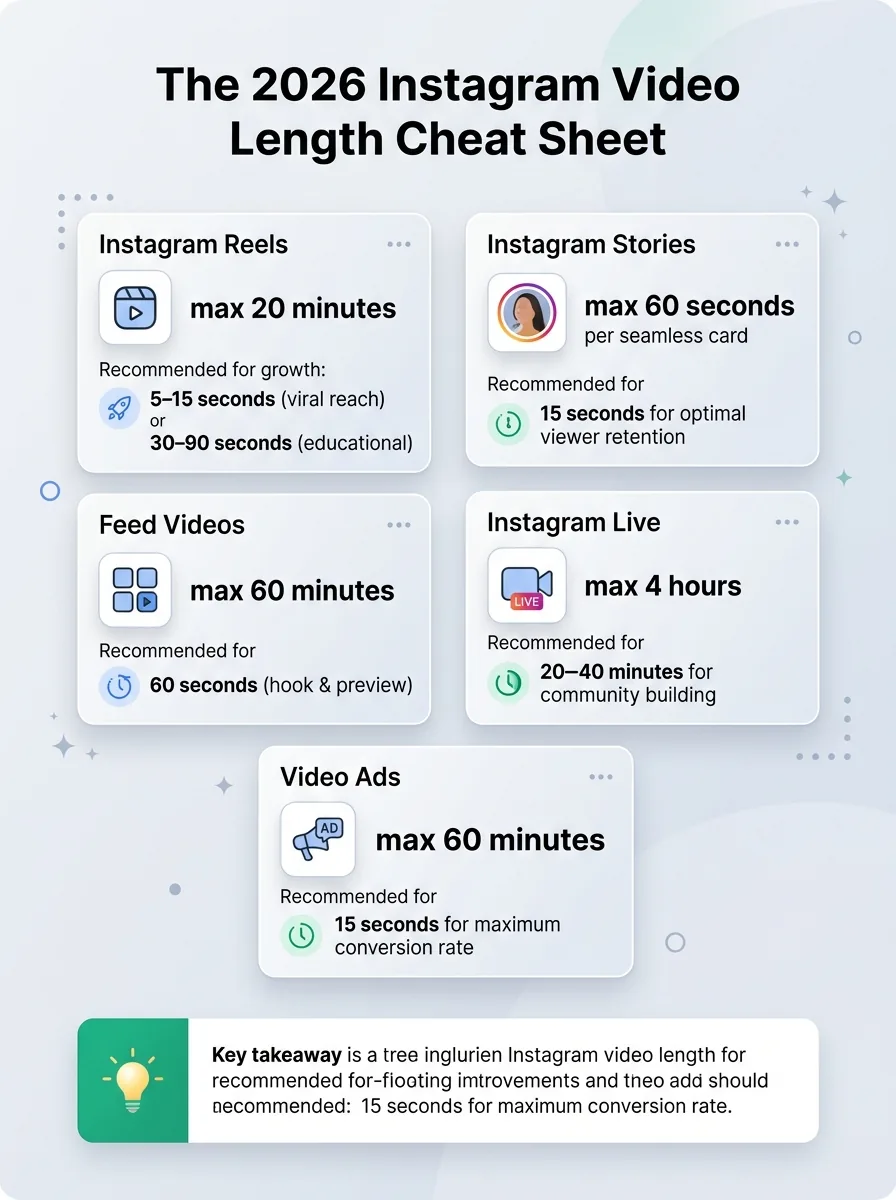
If you only have a minute, bookmark this table. There is a massive difference between what Instagram technically allows and what the algorithm actually rewards for growth.
Jump to a section:
- The 2026 Instagram Video Length Limits Cheat Sheet
- 1. Instagram Reels: The 20-Minute Era vs. The 90-Second Sweet Spot
- 2. Instagram Stories: 60-Second Seamless Cards
- 3. Instagram Feed Posts: The New 3:4 Revolution
- 4. Instagram Live & Video Ads
- 2026 Tech Specs: How to Stop Your Videos from Looking Blurry
- The "1-to-3 Waterfall" Repurposing Strategy
- Frequently Asked Questions (FAQs)
- Conclusion
Format | Maximum Limit (Technical) | Recommended Length (For Growth) |
|---|---|---|
Instagram Reels | Up to 20 Minutes | 5–15 Seconds (Viral Reach) / 30–90 Seconds (Educational) |
Instagram Stories | 60 Seconds (Per Seamless Card) | 15 Seconds (Optimal Viewer Retention) |
Feed Videos | 60 Minutes | 60 Seconds (Hook & Preview) |
Instagram Live | 4 Hours | 20–40 Minutes (Community Building) |
Video Ads | 60 Minutes (Feed) | 15 Seconds (Max Conversion Rate) |
1. Instagram Reels: The 20-Minute Era vs. The 90-Second Sweet Spot
Reels remain Instagram's primary engine for discovering new audiences. While the headline news for 2026 is that Instagram now allows Reels up to 20 minutes long (positioning itself closer to YouTube), you must tread carefully.
The Algorithm Reality: Technically, you can upload a mini-documentary. However, Instagram's discovery algorithm heavily stops recommending Reels longer than 3 minutes to non-followers.
The Strategy: Use shorter Reels (under 90 seconds) to capture top-of-funnel traffic and go viral. Save your 3-to-20-minute Reels for deep dives, tutorials, and nurturing your existing followers.
Specs: 1080 x 1920 pixels (9:16 aspect ratio).
2. Instagram Stories: 60-Second Seamless Cards
Gone are the days when a 30-second video would clunkily chop into 15-second segments.
The Limit: You can now upload uninterrupted Stories up to 60 seconds long.
The Strategy: Just because you have 60 seconds doesn't mean you should monologue. Viewer retention on Stories plummets after 15 seconds. Keep your Stories fast-paced. Use interactive stickers (polls, sliders) within the first few seconds to boost engagement signals.
Specs: 1080 x 1920 pixels (9:16 aspect ratio).
3. Instagram Feed Posts: The New 3:4 Revolution
In 2026, the traditional 4:5 or 1:1 square feed posts are practically obsolete. The new standard for feed videos is the 3:4 aspect ratio (1080 x 1440 pixels).
The Limit: Feed videos can be up to 60 minutes long.
The Strategy: The new 3:4 ratio takes up significantly more vertical screen space as users scroll, blocking out competing posts. Since videos over 60 seconds show up as a "preview" (requiring users to click to keep watching), keep feed videos punchy—around 30 to 60 seconds. Add dynamic captions to the top and bottom to utilize that extra vertical real estate!
4. Instagram Live & Video Ads
Instagram Live: Capped at 4 hours. Perfect for webinars, Q&As, or live podcast recordings. If you cross the 15-minute mark, the VOD (Video On Demand) can be saved directly to your profile.
Video Ads: While in-feed ads can technically stretch to 60 minutes, data proves that 15-second ads drive the highest click-through and conversion rates. Keep the hook in the first 3 seconds, or lose the sale.
2026 Tech Specs: How to Stop Your Videos from Looking Blurry
A major complaint creators have is high-quality footage turning blurry upon upload. Here is how to fix it in 2026:
Stop Exporting in 4K: Instagram's compression will ruin a 4K file. Export your videos in 1080p at 30fps.
Watch the Bitrate: Keep your bitrate between 15–20 Mbps.
Mind the 2026 UI Safe Zones: Instagram recently updated its interface overlay. Make sure no crucial text or faces are in the top 220px margin or the bottom 350px (where captions and the engagement buttons sit).
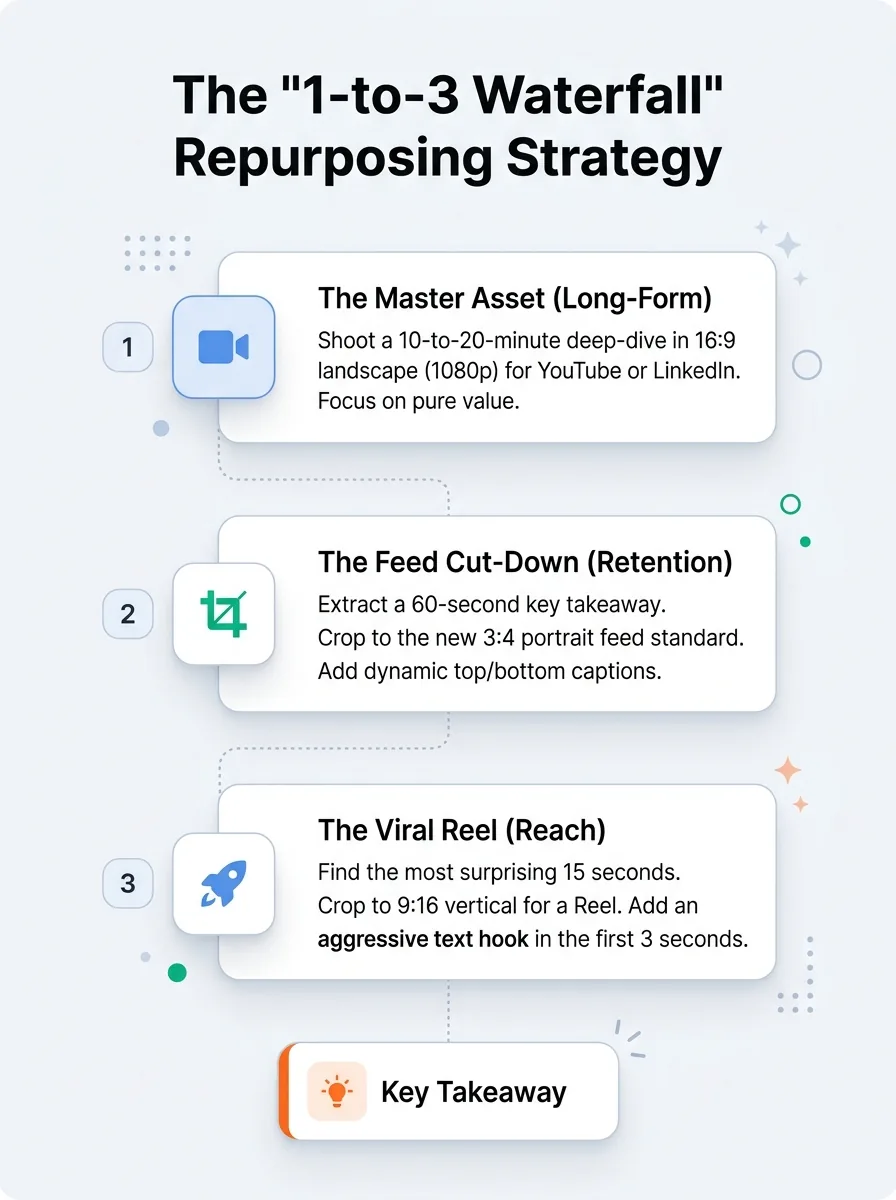
The "1-to-3 Waterfall" Repurposing Strategy
Don't let a great piece of content die on one channel. The smartest brands in 2026 use a "waterfall" strategy to turn one video asset into a month's worth of content.
The Master Asset (Long-Form): Shoot a 10-to-20-minute deep-dive interview or product demo in 16:9 Landscape (1080p) for YouTube or LinkedIn. Focus on pure value.
The Feed Cut-Down (Retention): Extract a 60-second "Key Takeaway." Crop it to the new 3:4 Portrait feed standard. Add dynamic top/bottom captions.
The Viral Reel (Reach): Find the most controversial, funny, or surprising 15 seconds. Crop it strictly to the center for a 9:16 Vertical Reel. Add an aggressive text hook in the first 3 seconds to stop the scroll. Then use our Instagram scheduler to post content consistently.
(Pro Tip: Use AI clip tools to automatically find the most engaging 15-second highlights from your long-form videos to save hours of editing time.)
Frequently Asked Questions (FAQs)
Does Instagram penalize Reels over 90 seconds?
It doesn't "penalize" them, but the algorithm rarely pushes Reels over 3 minutes to the Explore page or to non-followers. For pure account growth, stick to 15–90 seconds.
Why did my 60-second Story get chopped up?
Make sure your app is updated to the latest 2026 version. Instagram now supports seamless 60-second Story cards natively without chopping them into 15-second segments.
Can I upload an hour-long video from my phone?
Yes, but mobile uploads longer than 15 minutes are often automatically processed as Reels. If you want a traditional long-form Feed post (up to 60 minutes), it is highly recommended to upload via Instagram Desktop.
Ready to save 15+ hours every week?
Join other creators who've automated their social media with SocialCal.
Get started freeConclusion
Succeeding on Instagram in 2026 isn't just about making great videos; it's about making the right size videos. Align your content with the algorithm's preferences—short, punchy Reels for discovery, 60-second Stories for community engagement, and 3:4 Feed videos for maximum screen real estate. Adapt to these limits, utilize safe zones, and watch your engagement soar.