TikTok Duet is the side‑by‑side video response feature most people only use for quick reaction faces. But if you care about growth, learning how to duet on TikTok properly is basically learning how to borrow someone else’s viral momentum. The app literally has a mechanic for this: Duets of a trending video get pushed to people already watching the original, so your first few hundred views are almost “prepaid.”
Jump to a section:
- How do I Duet on TikTok?
- Most creators only use Duet for reactions — that's leaving 80% of its value on the table
- Why Duets get more reach than regular TikToks (the algorithm angle)
- How to Duet on TikTok step-by-step
- The 4 Duet layouts explained (and when to use each)
- When the Duet button doesn't appear
- How to grow with Duets (3 patterns that actually work)
- Duet vs Stitch — which to use when
- Why most people still get bad Duet results
- From one Duet to a Duet-heavy strategy
- A simple Duet checklist you can screenshot
- Frequently asked questions about Duets
- The principle: Duets are distribution, not just response
How do I Duet on TikTok?
To Duet on TikTok, open the video you want to respond to and tap the Share arrow on the right. Tap the Duet icon in the menu, choose a layout, then record your side while the original plays. Edit, add caption and hashtags, and post like a normal TikTok. The original creator needs Duets enabled for it to work.
Most creators only use Duet for reactions — that's leaving 80% of its value on the table
Most creators think “how to duet on TikTok” means “how do I make a reaction video with my face in the corner.” That’s the surface level.
Here’s what actually happens behind the scenes.
When you Duet a video that’s already getting views, TikTok temporarily treats you like part of that conversation. Your Duet is clustered with the original — so anyone who watched, rewatched, or commented on the original is way more likely to see your take next.
This is why Duets are such a cheat code for small accounts. You’re not begging the algorithm to figure out who might like your content from scratch. You’re stepping into an audience that’s already warmed up around that exact topic, sound, or joke.
The problem? Most people Duet random viral videos with “omg lol” energy and zero value. The algorithm has gotten smarter than that. It wants actual responses, not background faces.
Why Duets get more reach than regular TikToks (the algorithm angle)
Let’s talk about why Duets hit harder than posting solo, especially under 10K followers.
When you Duet, TikTok tags your video as related content to the original. That means your Duet is eligible to be served to viewers who:
- Watched the original all the way through
- Rewatched key moments
- Commented, liked, or shared it
- Watched similar videos in that topic/sound cluster
In practice, that “related” tag matters more than your follower count. For small accounts, a strong Duet of a trending video can pull 5–20× the views of a comparable standalone clip, because you’re riding the original’s distribution wave instead of starting from zero.
There’s a catch though: TikTok only treats your Duet as truly related if it adds something. The system can tell if you’re just silently staring at the screen vs explaining, challenging, harmonizing, or extending the original idea. Low-effort reaction faces get tested briefly, then throttled.
If you nerd out on this stuff, TikTok’s own documentation about how recommendations work backs this up: they explicitly mention clusters around “related videos” and viewer actions as a key ranking factor (source).
How to Duet on TikTok step-by-step
Let’s walk through exactly how to Duet on TikTok in a way the algorithm actually respects.
Step 1 — Find a video you actually want to Duet
Scroll your For You page, search a trending hashtag, or open a creator’s profile you already follow. You’re hunting for videos where a response would clearly make sense:
- A question or poll that invites a take (“What’s an unpopular opinion in your niche?”)
- A tutorial you can extend, simplify, or fix (“Here’s the step they missed”)
- A spicy opinion you can counter with receipts
- Music covers or dance trends you can harmonize, remix, or level up
Don’t just Duet because “it’s viral.” The algorithm is reading context — comments, captions, audio, even on-screen text — to decide if your Duet actually belongs in the same conversation.
Quick example: A finance creator Duets a basic “how to budget $1K/month” video and adds a 10-second overlay on what to do if you’re self-employed. That’s relevant, useful, and clearly connected. The system loves that.
Step 2 — Tap the Share arrow → Duet
Once you’ve found your video:
- Tap the video to open it.
- On the right side, tap the Share arrow.
- In the menu that appears at the bottom, swipe until you see Duet.
- Tap Duet to open the recording screen.
If “Duet” is greyed out or totally missing, the creator has disabled Duets for that video or their whole account. There’s no hack here — you either pick a different video or politely message them asking if they’ll re-enable it for that post.
Step 3 — Choose your Duet layout
Next, pick a layout. This matters more than most people think.
- Left/Right (default) – Classic side-by-side. Best when both of you are talking and you want a conversation vibe.
- Green Screen – The original plays behind you. Great for tutorials, explainers, or breakdowns where you want to point at parts of the video.
- Top/Bottom – Vertical stack. Perfect for comedy bits, captions, or side-by-side transformations where text overlays need room.
- Picture-in-Picture – Original floats in a corner. Use this when you are the main show and the original is supporting context (commentary, interviews, storytelling).
Most creators spam Left/Right because it’s default. But in practice, Green Screen and Top/Bottom often perform better because they signal more effort and intention to both viewers and the algorithm.
Step 4 — Record your half
Now hit the red record button.
The original plays on one side while you film on the other. You can press and hold, then release to pause, then press again to time your reactions or commentary with specific beats in the video.
Some quick performance rules I’ve seen across accounts:
- 8–15 seconds usually wins. Long rambles bleed retention.
- React to one strong moment, not the entire 60-second video.
- Use the first 1–2 seconds to signal what you’re doing: text like “Here’s the missing step” or “No, here’s what actually works.”
Think of your Duet as a sharp reply tweet, not a full essay. More focus = better watch time = more pushes.
Step 5 — Add caption + hashtags + post
Last step: package it so TikTok can understand and distribute it.
- Tag the original creator with
@username. This is huge. It strengthens the relevance signal, notifies them, and can lead to re-shares or them replying with another video. - Use 3–5 hashtags: a mix of niche tags, 1–2 trending topic tags, plus
#duetor#duetwithme. If tagging stresses you out, a tool like a TikTok Hashtag Generator can give you a starting set in seconds. - Write a short, specific caption that clarifies the angle of your response, not a vague “omg this” sentence.
Then post. The first 30–60 minutes matter most, so if possible, post when you know your followers are active so your early engagement tells the algorithm “this one’s good.”
Ready to save 15+ hours every week?
Join other creators who've automated their social media with SocialCal.
Get started freeThe 4 Duet layouts explained (and when to use each)
If you want to squeeze real reach out of Duets, stop blindly using the default layout. The format should match your intention.
Here’s how I think about each one.
Left/Right — the default “conversation” mode
Best for: back-and-forth takes, facial reactions where both faces matter, collabs, music harmonies.
Use Left/Right when viewers need to watch both screens equally. For example, a singer duetting a cover with harmonies, or a coach reacting to another coach’s advice with on-screen expressions and quick interjections.
Green Screen — tutorial and breakdown king
Best for: tutorials, explainers, breakdowns, commentary where you want to point at stuff.
You’re literally standing in front of the original video. Great for “here’s what’s wrong with this” or “watch how they do this step” content. I’ve seen education creators double their average view count just by switching reactive Duets from Left/Right to Green Screen because it feels more like a mini-lesson.
Top/Bottom — comedy and text-heavy content
Best for: comedy skits, meme responses, before/after, and any Duet with heavy text overlays.
Because the frame is stacked vertically, your captions and subtitles are easier to read. Think of a fitness creator reacting to someone’s workout form on top, with their corrections and tips on the bottom.
Picture-in-Picture — you’re the main character
Best for: storytelling, commentary, interviews, and situations where the original is just context.
Here, you fill the screen and the original floats in a corner like B-roll. This works well once your audience already cares about you and your take. For newer accounts, I’d use this sparingly until people actually show up for you, not just the original trend.
When the Duet button doesn't appear
You’re ready to film, but the Duet button’s missing. Super common. Three main reasons.
The original creator disabled Duets
Every user can block Duets either for their whole account or individual posts. If “Duet” is missing or greyed out in the share menu, that’s what happened.
No trick gets around this. Your options are:
- Pick a different video on the same topic
- Save the idea and recreate the premise in your own words
- DM or comment asking the creator if they’d consider turning Duets on
Your own Duet privacy is restricted
Sometimes the issue is your settings.
- Open your TikTok profile.
- Go to Settings and privacy → Privacy → Interactions → Duet.
- Set it to Everyone if you want public Duets.
If this is set to Friends or Off, your Duets might not post publicly, or the app may behave weirdly while trying.
The original is a private account
Private accounts are off-limits for Duets. Their videos aren’t eligible for public remixing at all.
If you really want to respond, you can:
- Ask them directly if they’re okay with you recreating the scenario without their footage
- Use their idea as a prompt and make your own standalone TikTok
How to grow with Duets (3 patterns that actually work)
Once you know how to duet on TikTok mechanically, the real question is: how do you turn this into consistent growth, not just random flukes?
Here are three Duet patterns I’ve seen work over and over.
Pattern 1: Add value to a popular tutorial
Find a trending “how to” in your niche: makeup, coding, Notion setups, whatever.
Duet it and either:
- Fix a mistake or myth
- Add a missing step (“Here’s what to do after this”)
- Simplify a complex explanation for beginners
Why this works: TikTok wants to keep viewers on a topic for as long as possible. Your Duet extends the life of that tutorial by making it more complete, so the system has a reason to show your video right after the original.
Action: Search your niche plus “tutorial” or “beginner” and Duet the top 3 results that have active comments but are missing nuance you can easily add.
Pattern 2: Niche reactions to bigger creators
Pick creators 5–10× your size in your niche. Not celebrities. People your eventual followers probably already watch.
Duet their takes with informed commentary: agree and deepen, or disagree and bring receipts. This is different from “omg so true” reactions — you’re positioning yourself as someone who belongs in the same conversation tier.
Example: A small nutrition coach duets a bigger creator’s “3 foods to avoid” video, calmly explaining the nuance and context the original left out. Viewers who are tired of clickbait often follow the calmer, more thoughtful voice.
Action: Make a list of 10 creators in your lane. Turn on post notifications for 3–5 of them. Duet one of their videos each week with a strong, clear angle.
Pattern 3: Duet polls and question videos with your specific answer
Some of the fastest-spreading Duets come from simple prompts: “Creators, what’s one thing you’d never do again?”, “What’s the worst advice you got starting out?”, “What’s the one habit that changed your income?”
These prompt chain-Duets — someone Duets the original, then others Duet them, and so on. TikTok clusters all of those together.
Action: Search question-style sounds or look for “Duet this and tell me…” style videos in your niche. Record concise, story-driven answers instead of generic platitudes.
Duet vs Stitch — which to use when
Quick confusion point: Duet is not the only remix option. Stitch exists too, and they’re not interchangeable.
- Duet plays both videos at the same time, side-by-side (or stacked/overlaid, depending on layout). Use it when viewers need to see your reaction while the original plays: live reactions, harmony collabs, comedy timing, side-by-side comparisons.
- Stitch lets you take up to 5 seconds of the original at the start of your video, then it cuts to your full-screen content. Best for “let me actually answer this” or “here’s what they got wrong” where the original is just a setup.
In practice: Stitches tend to drive more profile visits (people click to see who’s talking). Duets tend to spark more comments because it feels like a live conversation.
You don’t have to pick a forever favorite. A healthy TikTok strategy usually mixes both.
Why most people still get bad Duet results
Even with a solid handle on how to duet on TikTok, a lot of creators still see “meh” numbers. Usually because of a few repeat mistakes.
Picking a low-engagement original
Duets inherit roughly 10–30% of the original’s recent reach window. So Duetting a post with 200 views and 0 comments isn’t magically going to give you 2,000 views.
Look for:
- View count that’s high for that creator (not just high in absolute terms)
- Comments from the last few hours, not weeks ago
- A posting pattern where that creator is actively publishing, not returning from a 3-month break
Not tagging the original creator
Skipping the @ tag is a reach killer. TikTok uses creator connections as a strong signal when clustering related videos.
No tag = weaker relevance to the original = fewer viewers from that cluster see your Duet. You also lose the chance that the creator notices you and shares your video to their audience.
Generic reaction faces with no value-add
The platform is flooded with blank stares and over-the-top shock faces. The novelty burned out years ago.
If you’re not already known as a reaction creator, that style almost never builds a consistent audience now. The algorithm can see when your side isn’t contributing new words, movements, or visual elements; those get tested with a tiny batch and then quietly shelved.
Make your Duet worth watching even if the original were muted. That mindset usually fixes this.
Posting the Duet days after the original blows up
The first 24 hours of a video’s life are when its Duet window is widest. That’s when TikTok is throwing it in front of tons of new viewers to see how it behaves.
Duetting a 3-day-old viral clip can still work, but you’ll usually see a fraction of the reach you’d get duetting the same video within hour 6–12. Notifications are your friend here: turn them on for the creators you regularly Duet so you can catch bangers early.
From one Duet to a Duet-heavy strategy
One random Duet that pops is fun. But it doesn’t move your account long-term.
Real growth happens when Duets become a format inside a consistent posting rhythm: maybe 3–4 Duets per week plus your original videos. That consistency trains both the algorithm and your audience to expect your take on whatever’s trending in your niche.
The algorithm doesn’t need perfection; it needs patterns. Accounts that win tend to publish on a predictable cadence, so every new Duet gets a decent initial test batch. The real bottleneck isn’t learning how to duet on TikTok; it’s being able to do it every week without burning out or losing track of what you’ve posted.
This is where scheduling saves you. Plan your originals, then pencil in 2–3 Duet “slots” where you’ll plug in the best videos from that week. A visual calendar like SocialCal’s TikTok Scheduler makes this stupid simple: you drag Duets and originals onto a weekly grid and stop guessing what to post every night at 11 PM.
A simple Duet checklist you can screenshot
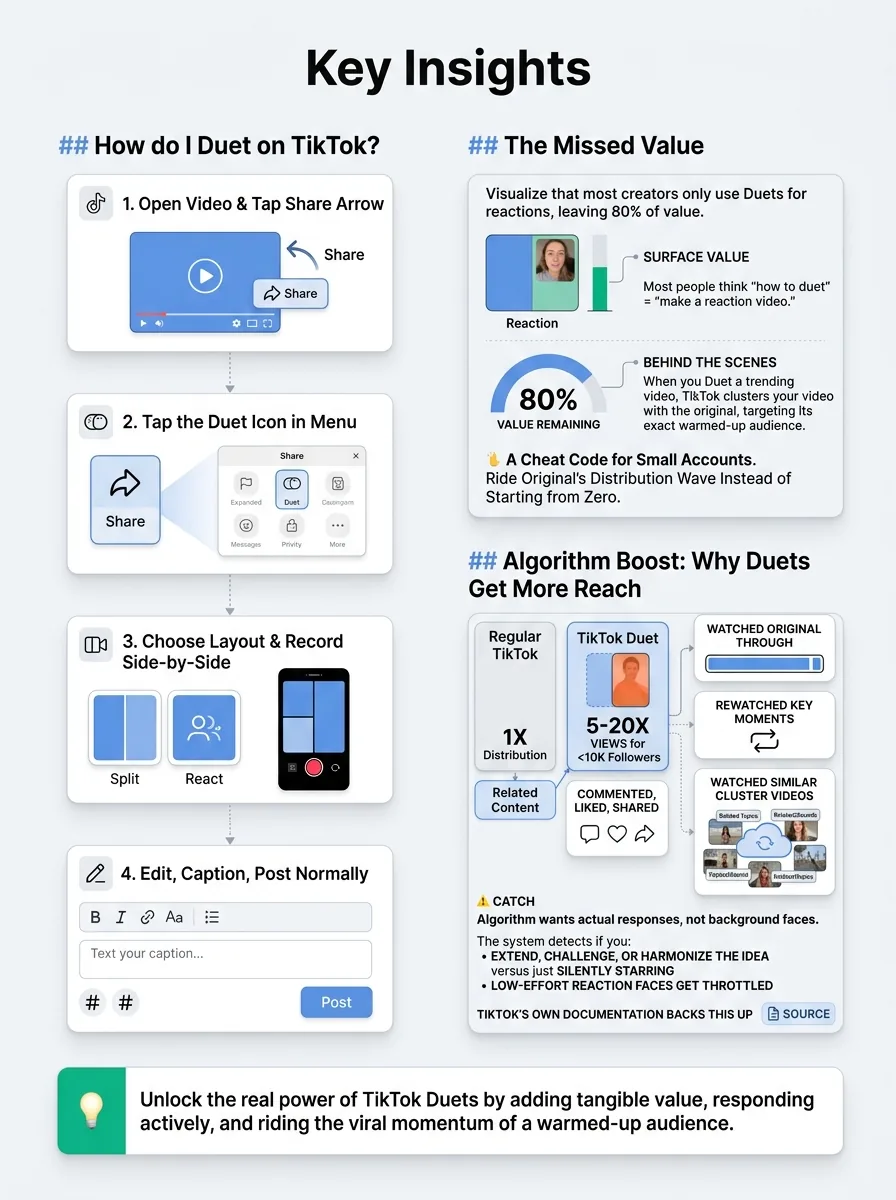
Here’s a quick framework you can follow every time you create a Duet.
- Pick the right original – Recent views, active comments, clearly in your niche.
- Choose the right layout – Left/Right for conversation, Green Screen for breakdowns, Top/Bottom for comedy/text, PiP when you’re the main subject.
- Define your angle in one sentence – “I’m adding the missing step,” “I’m disagreeing with their third point,” “I’m telling a story that answers this question.”
- Hook in the first 1–2 seconds – Use on-screen text or a strong first line to tell viewers why they should watch your side.
- Keep it tight – Aim for 8–15 seconds, reacting to one key moment, not the entire video.
- Tag and title it properly – @ the creator, add 3–5 solid hashtags (or use a TikTok Caption Generator if you’re blanking), keep the caption specific.
- Post while the original is hot – Ideally within 24 hours of it starting to trend.
- Watch comments for content ideas – Often your next 2–3 Duets can come from questions people ask under this one.
Ready to save 15+ hours every week?
Join other creators who've automated their social media with SocialCal.
Get started freeFrequently asked questions about Duets
Why can't I Duet a TikTok video?
Either the creator disabled Duets for that video/account, the video is from a private profile, or your own Duet privacy settings are restricted. Check your settings under Privacy → Interactions → Duet. If Duet is missing completely from the share menu on someone else’s video, there’s nothing you can do except choose a different video or ask them to enable it.
Can I Duet on TikTok Web (desktop)?
As of 2026, Duet creation is still primarily mobile-first. TikTok’s web upload lets you post regular videos, but features like Duet and Stitch are limited or missing in many regions. The safest path is to record Duets inside the mobile app, and use desktop tools like a TikTok Downloader only for saving your own posted videos for repurposing elsewhere.
How do I disable Duets on my own videos?
Go to Settings and privacy → Privacy → Interactions → Duet and set it to Friends or Only me to limit who can Duet you. You can also turn Duets off on a specific video: open your post, tap the three dots, then Privacy settings, and toggle Allow Duet off.
Does duetting a copyrighted song get my video muted?
If the original uses licensed music from TikTok’s own library and is available in your region, you’re usually safe; your Duet inherits that same audio. Where people get into trouble is using third-party or edited audio that isn’t cleared by TikTok. The platform’s audio rules change a lot, so keep an eye on their official updates: https://support.tiktok.com.
What's the difference between Duet and Reply with Video?
Duet links your new video side-by-side with the original, and it’s shown to viewers who engaged with that original. Reply with Video attaches your video as a response to a specific comment on your own post. That reply shows up under your original video and can also get pushed as a standalone post, but it’s not clustered with someone else’s content like Duets are.
The principle: Duets are distribution, not just response
If you remember one thing, make it this: Duets aren’t just a cute reaction format. They’re a distribution mechanic. Every time you duet a strong, timely video with an actual angle, you’re borrowing that video’s momentum to train the algorithm who you’re for.
Growth on TikTok isn’t about filming the “perfect” Duet. It’s about showing up with focused, value-adding Duets week after week until the system and your audience both recognize you. If keeping that rhythm is the hard part, building a simple weekly plan in a content calendar (I use SocialCal’s Content Calendar) will help you stop guessing and start posting on purpose.