Instagram has SIX different video length caps depending on where you post — so if you’re googling “how long can a video be on Instagram” and getting IGTV-era answers, that’s why everything feels wrong. The limits changed, the formats changed, and most creators are still editing for 2022 rules.
Jump to a section:
- Instagram video limits in 2026 (it's not one number)
- How long can an Instagram video be?
- Why Instagram has so many video formats
- Reels: 90 seconds (and the 15-minute exception)
- Stories: 60 seconds (auto-split into 15-second segments)
- Feed posts: 60 minutes (formerly IGTV, now consolidated)
- Live: 4 hours per stream
- DM video messages: 60 seconds
- Mistakes creators make with video length
- From format limits to format-aware planning
- Quick reference: Instagram video length cheat sheet
- Frequently asked questions
- The principle: format choice IS strategy
Instagram video limits in 2026 (it's not one number)
Here’s the 2026 reality: Instagram’s video cap depends on the format. Reels, Stories, Feed, Live, DMs — they all have different rules, aspect ratios, and behavior from the algorithm. If you don’t match the format to the idea, the problem isn’t “Instagram won’t let me post,” it’s usually “wrong format for what I’m trying to do.”
How long can an Instagram video be?
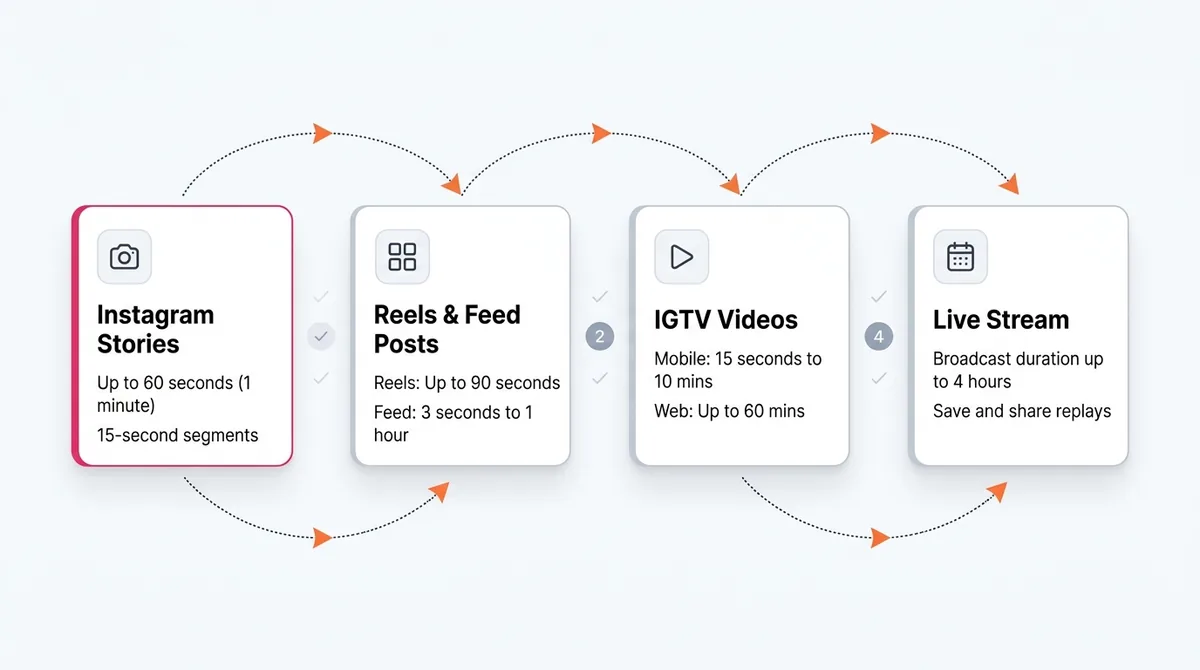
Instagram’s 2026 video length caps: Reels up to 90 seconds (15 minutes for select creators), Stories up to 60 seconds per slide (auto-split into 15s chunks), Feed posts up to 60 minutes, Lives up to 4 hours, and DM video messages up to 60 seconds. Each format also has its own preferred aspect ratio and quality constraints.
Why Instagram has so many video formats
Let’s clear something up: Instagram doesn’t have all these formats to confuse you. It has them because people watch video in very different ways.
Quick history lesson:
- Stories launched in 2016 to copy Snapchat’s “quick, disposable” content habit.
- Live arrived the same year for stream-style connection and events.
- IGTV dropped in 2018 to chase YouTube’s long-form throne… and quietly got merged into Feed in 2022.
- Reels launched in 2020 as the TikTok counter — fast, snackable, scroll-crack content.
Each one targets a different consumption pattern:
- Reels: quick hits. The algorithm shoves them at strangers and measures watch time brutally. If people don’t stick, it dies.
- Stories: warm audience. Mostly your followers, tapping quickly, half-watching, half-texting.
- Feed videos: more intentional. People actually stop scrolling to watch — but only if the hook is good.
- Lives: appointment-based. Fans choose to show up and stay.
So when you’re asking “how long can a video be on Instagram,” what you’re really asking is: how long can a video be before people stop caring in this specific format. The tech limit is one thing. The attention limit is another story.
Most frustrations — “my 10-minute tutorial won’t post,” “why is this Story chopped up,” “why won’t my Reel be longer” — are really format mismatches. Long-form dumped into Reels. Reels-style hooks inside a 45-minute feed video. It all works better when you pick the format for the behavior you’re targeting.
Ready to save 15+ hours every week?
Join other creators who've automated their social media with SocialCal.
Get started freeReels: 90 seconds (and the 15-minute exception)
Standard Reels: 90-second cap
For most creators in 2026, Reels max out at 90 seconds.
This is the “default” short-form slot. The algorithm treats Reels like a constant A/B test machine: throw your content at a small sample, see who stops, who stays, who rewatches, who shares. If that early group behaves well, distribution widens. If not, it flatlines.
The key metrics that matter for length:
- First 3 seconds: hook or die. People swipe based on the opening frame and line.
- Average watch time: how many seconds people actually stick around.
- Completion rate: what % of viewers reach the end at least once.
A tight 24-second Reel that 80% of viewers finish will usually beat a 90-second one that most people bail on at 18 seconds. Yes, even though the second is “longer content.” The algorithm optimizes for satisfying loops, not for you using every available second.
Tech specs that actually matter:
- Aspect ratio: 9:16 vertical is the standard. Fill the screen.
- Resolution: 1080 x 1920 minimum. Lower than that and it looks crusty.
- File size: Instagram compresses anyway, but don’t upload huge 4K exports when 1080p is enough — it just slows you down.
Practical move: edit your Reel to the shortest version that still delivers the pay-off. You’re not being paid by the minute.
Long Reels: up to 15 minutes (creator-specific)
In 2024, Instagram started quietly testing Reels up to 15 minutes with select creators who had strong watch time and healthy accounts. As of 2026, that rollout is broader — but not universal.
Here’s how to know if you’ve got it:
- Open the Reels composer.
- Load a video longer than 90 seconds.
- If Instagram lets you pull the full thing in and shows a 15:00 cap, congrats — your account’s in the long-Reels bucket.
Most creators overestimate how useful this is, by the way. A 12-minute talking-head clip thrown into Reels rarely performs unless your audience is already obsessed with you. Long Reels work best for:
- Deep tutorials with strong visuals (think editing timelines, design screen share).
- Storytimes with tension baked in from second one.
- Repurposed clips from podcasts or livestreams with hard-hitting moments.
Mechanism-wise, Instagram is trying to keep people in Reels instead of sending them to YouTube for longer content. But the same rule applies: if people don’t stick, the format “freedom” doesn’t matter.
Cross-posting from TikTok or YouTube Shorts
If you’re posting across platforms, the length limits don’t line up neatly:
- TikTok supports up to 10-minute videos for many users.
- YouTube Shorts caps at 60 seconds.
- Instagram Reels sits in the middle with 90 seconds (or 15 minutes if you’re in the test group).
This is why you upload a 2:30 TikTok and then swear at Instagram because “it won’t let me post it as a Reel.” Different rules, different product.
Here’s what actually works:
- Edit the master version first (usually 2–5 minutes for TikTok or YouTube).
- Create a 60–90 second “core” cut for Reels and Shorts.
- Use platform-specific hooks and overlays so it doesn’t scream “repost.”
If you want to reverse-engineer what’s working, grab a few viral Reels from your niche with an Instagram Reel Downloader and literally study the timestamps: when do they cut, how fast do they switch angles, where do they reset the hook?
Stories: 60 seconds (auto-split into 15-second segments)
Stories are a different beast. Each Story slide can now be up to 60 seconds long in 2026 — but Instagram still slices that into roughly 15-second chunks behind the scenes.
That’s why you see the multi-section progress bar even when you upload “one” 45-second clip. Instagram treats it as several micro-slides stitched together.
What this means for you:
- Pacing matters. If you record a 53-second rant with no pauses, Instagram might cut it mid-sentence every 15 seconds. Jarring.
- Design natural beats every ~12–14 seconds. Small pauses, angle changes, or text shifts so the auto-split feels intentional.
- Remember: 24-hour expiry doesn’t care how long the Story is. A 5-second Story and a 60-second Story both vanish at the same time.
Behavior-wise, Stories are where your existing audience “hangs out” with you. People tap through with muscle memory. Instagram ranks your bubble based on how often they watch, reply, tap back, and use interactive stickers. Longer isn’t automatically better here — any slide that feels draggy trains people to tap faster on your face.
If you want to see how your competitors pace their Stories, saving a few with an Instagram Story Downloader and rewatching them slowly is eye-opening. You’ll notice patterns: quick time jumps, different backgrounds, and hooks every few taps.
Feed posts: 60 minutes (formerly IGTV, now consolidated)
IGTV as a separate thing is gone. Since 2022, long-form lives inside regular Feed posts.
Current limit: up to 60 minutes per feed video.
The catch — and this is where most creators get burned — is the preview limit. The in-feed preview is still capped at about 60 seconds. Everything after that requires a tap to “keep watching.”
Here’s what that does to your performance:
- Algorithm tests your video on a chunk of your followers.
- It tracks how many stop to watch, how long they stay, and whether they tap to continue.
- If most people just scroll past or bail before hitting the tap, Instagram interprets it as low-interest content.
So yes, you can post that 37-minute tutorial. But if your hook isn’t strong enough to earn the tap, completion rate will be trash, and distribution will tank.
Format specs that matter here:
- Aspect ratios: 1:1 (square), 4:5 (tall), 16:9 (landscape).
- Best performer in practice: 4:5 vertical. It owns more feed real estate without looking awkward.
What I see work best in 2026 is a combo move: publish the full 10–30 minute video to the feed, then cut a 30–60 second “trailer” as a Reel with a hard hook and obvious payoff. Use the Reel to drive people to the longer feed video or off-platform to YouTube.
If you’re repurposing from YouTube, using an Instagram Downloader alongside a YouTube downloader makes trimming and testing different cuts way less painful.
Live: 4 hours per stream
Instagram Live gives you up to 4 hours per session as of 2026. That’s more than enough for most creators — Q&As, co-working, launches, webinars, live edits.
What actually matters is how that Live turns into content after the broadcast:
- Once you end the Live, Instagram lets you save it.
- You can publish a cut as a Reel (usually 90-second preview + link to longer archive).
- The full Live is stored for about 30 days unless you download or save it elsewhere.
The algorithm treats Lives differently from Reels and Feed. The main signal is: do people join and stay? Are they commenting? Are they adding friends? That live engagement can then give your next Reels and Posts a small bump because your account just signaled “active & interesting” to Instagram.
Smart play: treat Live like raw content capture. Host a 60–90 minute session, then chop it into:
- 5–10 short Reels (30–60 seconds each).
- 1–2 mid-length feed videos (5–15 minutes).
- Story recaps with text overlays for your warm audience.
DM video messages: 60 seconds
DM video limits don’t sound sexy, but if you work with a team or clients, you run into this all the time.
Current cap: 60 seconds per DM video message.
So if you try to send a 2-minute screen recording explaining a hook idea to your editor, Instagram will reject it or auto-trim. That’s why those “why did my DM cut off mid-sentence?” moments happen.
Realistically, you’ve got three options:
- Keep DM videos under 60s and send in parts.
- Share a private link (Drive, Notion, Loom, YouTube unlisted) for longer clips.
- Use voice notes instead — people tolerate those being longer way more than video.
Mistakes creators make with video length
Cutting Reels to exactly 90 seconds
Most creators treat 90 seconds like a target instead of a ceiling. They stretch a 35-second idea into a 1:29 Reel, then complain about “bad reach.”
The algorithm rewards completion, not “maximum duration used.” A 28-second Reel with 85% completion looks like a banger to Instagram. A 90-second Reel with 22% completion looks boring.
So if the raw cut of your Reel is 33 seconds and it’s tight, leave it. Don’t tack on filler, extra slides, or a long outro. Think YouTube for depth. Think Reels for impact per second.
Posting long videos to the main feed with no support
Yes, you can post 20, 40, or 60-minute videos to your feed. No, that doesn’t mean anyone will watch them from cold.
The 60-second preview wall is brutal. If you don’t sell the value of the full video inside that first minute, most people never tap through. And if they don’t tap, the algorithm assumes “meh” and stops pushing it.
Better play:
- Post the full video as a feed post for your warmest fans and archive.
- Create a Reel trailer (30–90 seconds) with a cliffhanger or transformation.
- Point people to the full video in the caption or comments.
This two-step funnel respects how people actually browse: they meet you in Reels, then choose to go deeper in feed or off-platform.
Forgetting Stories auto-split
Creators constantly upload a single 50-second talking clip to Stories, then wonder why it “feels weird.” It’s because Instagram silently chopped it into ~3.3 pieces.
Your viewers see that as multiple tiny slides, each with its own mental restart. If your thought is mid-sentence when the bar snaps to the next segment, it feels glitchy.
Fix it by designing for the split:
- Natural reset every 10–15 seconds.
- Quick angle, zoom, or shot change between segments.
- Text that updates every segment, not one massive paragraph.
Ignoring aspect ratio per format
Another big one: using one size for everything because “it’s faster.” That’s usually code for “I haven’t looked at my own content like a viewer does.”
Here’s the actual state of things:
- Reels & Stories: 9:16 vertical. Full-screen or you’re wasting real estate.
- Feed video: supports 1:1, 4:5, and 16:9 — but 4:5 almost always wins for scroll-stopping.
If you’re repurposing a horizontal YouTube video, use a Social Video Resizer or your editor to recrop clips vertically and add background blur or text bars. Lazy, uncropped landscape uploads on Reels just look like ads no one paid for.
From format limits to format-aware planning
Knowing “how long can a video be on Instagram” by format is the basics. Turning those limits into an actual content system is where growth comes from.
Here’s a simple breakdown that works for most creators:
- Reels: reach plays. 3–7 per week focused on discovery.
- Stories: relationship plays. Daily, low-pressure updates.
- Feed videos: depth plays. 1–2 longer pieces per week.
- Lives: event plays. Weekly or monthly, tied to launches or key topics.
The algorithm doesn’t just reward “great content.” It rewards predictable behavior. Posting at roughly the same times, a few times a week, trains both your audience and Instagram’s systems to expect activity from you. That improves your early engagement velocity — those first 30–60 minutes where the algorithm decides whether to keep pushing your video or let it quietly die.
The real issue usually isn’t “I don’t know the right format.” It’s “I can’t hit this cadence consistently without burning out.” That’s where scheduling stops being a “nice-to-have” and turns into guardrails for your brain.
A visual planner like the Instagram Scheduler in SocialCal lets you map Reels, Stories, and Feed videos across the week, so you’re not trying to remember “did I post a Reel yet this week?” while you’re halfway through editing a client project.
Quick reference: Instagram video length cheat sheet
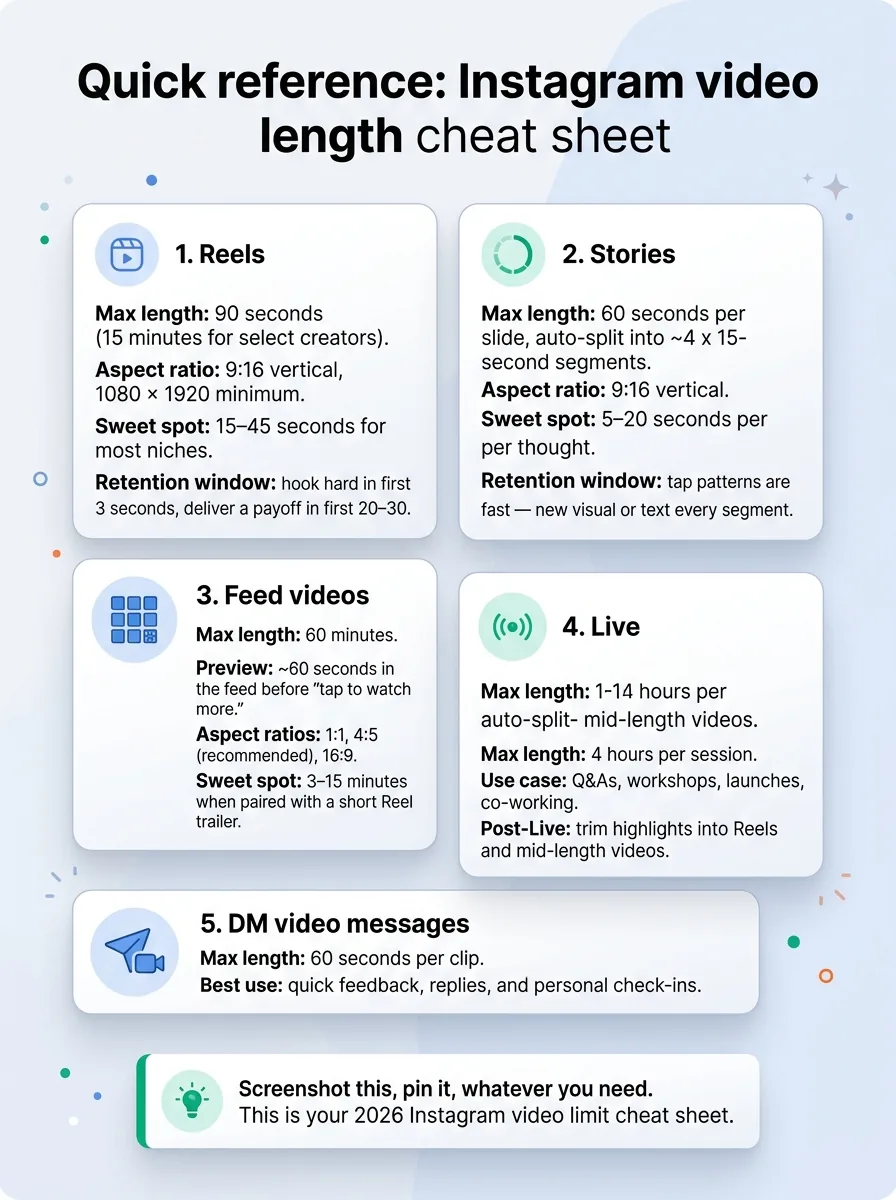
Screenshot this, pin it, whatever you need. This is your 2026 Instagram video limit cheat sheet.
-
Reels
- Max length: 90 seconds (15 minutes for select creators).
- Aspect ratio: 9:16 vertical, 1080 x 1920 minimum.
- Sweet spot: 15–45 seconds for most niches.
- Retention window: hook hard in first 3 seconds, deliver a payoff in first 20–30.
-
Stories
- Max length: 60 seconds per slide, auto-split into ~4 x 15-second segments.
- Aspect ratio: 9:16 vertical.
- Sweet spot: 5–20 seconds per thought.
- Retention window: tap patterns are fast — new visual or text every segment.
-
Feed videos
- Max length: 60 minutes.
- Preview: ~60 seconds in the feed before “tap to watch more.”
- Aspect ratios: 1:1, 4:5 (recommended), 16:9.
- Sweet spot: 3–15 minutes when paired with a short Reel trailer.
-
Live
- Max length: 4 hours per session.
- Use case: Q&As, workshops, launches, co-working.
- Post-Live: trim highlights into Reels and mid-length videos.
-
DM video messages
- Max length: 60 seconds per clip.
- Best use: quick feedback, replies, and personal check-ins.
Ready to save 15+ hours every week?
Join other creators who've automated their social media with SocialCal.
Get started freeFrequently asked questions
How long can an Instagram Reel be in 2026?
For most accounts, Instagram Reels can be up to 90 seconds long in 2026. Some creators have access to extended Reels up to 15 minutes, which usually shows up if your account is part of that test group. Check your Reels composer — if it lets you upload longer than 90 seconds, you’ve got it.
Can I post a 30-minute video on Instagram?
Yes. You can post a 30-minute video as a Feed video, since the feed cap is 60 minutes. Just remember the first ~60 seconds are all users see in the main feed; they’ll have to tap “watch more” to see the rest. A short Reel trailer usually helps send people to that full video.
Why does my Story split into segments?
Your Story splits into segments because Instagram still treats Stories in 15-second slices internally. Even though you can upload up to 60 seconds in one file, Instagram chops it into multiple 15-second segments behind the scenes, which is why the progress bar has several little chunks for one Story.
What’s the Reels length limit for new accounts?
New Instagram accounts typically start with the standard 90-second Reel limit. The extended 15-minute Reels option is gradually rolling out, but it’s not tied to account age alone — Instagram tends to grant it to accounts with consistent posting and solid watch time signals. There’s no public “threshold” documented on Instagram’s Help Center, so treat 90 seconds as your working cap.
Can I extend Reels to 15 minutes?
You can’t manually “turn on” 15-minute Reels. That feature is controlled entirely by Instagram and is still rolling out across regions and account types. Your only real moves are to keep posting consistently, focus on retention and completion, and check your composer periodically to see if the longer option shows up.
The principle: format choice IS strategy
Most “Instagram won’t let me post this” headaches aren’t tech problems — they’re format problems. You’re trying to shove a 20-minute YouTube idea into a Reel slot or telling a Story that should really be a Live.
Growth on Instagram isn’t about squeezing every second out of each limit. It’s about picking the right format for the job, then showing up in that format consistently enough for the algorithm and your audience to trust you. If you’d rather not keep all those moving parts in your head, parking your Reels, Stories, and Feed videos inside a simple Content Calendar is the kind of boring system that quietly keeps your account growing while you focus on making better videos.