You search YouTube for a video you know exists… and all you get is “Video unavailable.” No context. No explanation. Just gone. If you’re wondering how to find deleted YouTube videos without wasting hours on sketchy sites and dead ends, you’re in the right place.
Jump to a section:
- How can I find deleted YouTube videos?
- "Video unavailable" doesn't always mean gone
- Why YouTube videos disappear (and what each reason means for recovery)
- Method 1: Wayback Machine (archive.org)
- Method 2: Google Cache + search operators
- Method 3: Third-party YouTube archives
- Method 4: Recovery from the original creator
- Mistakes when searching for deleted videos
- For creators: protect your own content from this
- Quick framework: Where to look first
- Frequently asked questions
- The principle: most "deleted" videos exist somewhere
YouTube removes videos for dozens of reasons — creator deletion, copyright strikes, channel terminations, age limits, geo blocks. Each one leaves a different footprint. Some “deleted” videos are actually still live. Some are gone from YouTube but saved elsewhere. Some are just… gone. Knowing which is which is how you stop searching for ghosts.
How can I find deleted YouTube videos?
You can find deleted YouTube videos by checking the Wayback Machine, using Google’s cached pages, searching archive.org, or using third-party YouTube archives like YouTubeArchive. If you still have the video URL or ID, your chances are much higher. If you don’t, search the exact title or keywords across those archives and Reddit.
"Video unavailable" doesn't always mean gone
Most people assume that once a YouTube video disappears, it’s gone forever. Not true. That’s like thinking a deleted tweet means it never got screenshot.
Here’s the annoying part: YouTube doesn’t tell you why something is unavailable. The same generic error covers at least five different situations. Algorithmically, it doesn’t matter why it’s gone — the page just stops serving content. But for you as the viewer (or creator), the reason behind it totally changes how you should search.
Some examples:
If it’s age-gated, a VPN or login fixes it in seconds.
If it’s region-blocked, the URL still works, just not where you’re sitting.
If it was hit with a copyright strike months ago, Google’s cache is useless, but archive sites might still have a copy.
If the creator rage-deleted it yesterday, Google’s cache is probably your best friend.
The reason people struggle with how to find deleted YouTube videos is simple: they treat every “Video unavailable” message the same. So they use the wrong tool for the wrong problem and assume nothing works.
Let’s fix that.
Why YouTube videos disappear (and what each reason means for recovery)
Before you go on an archive rabbit hole, figure out how the video likely disappeared. That alone will tell you where to spend your time — and what to skip.
Creator deletion (most common, often recoverable)
This is the classic “I said something dumb, I’m embarrassed, delete delete delete” situation. Or the creator just cleaned up old content, migrated niches, or removed outdated info.
What this means for recovery:
If the video ever had real traction (tens of thousands of views or more), there’s a decent chance it was crawled by archive bots or saved by fans.
The video page is often archived (title, description, thumbnail) even if the video file isn’t playable.
The creator almost definitely still has the original file somewhere on a hard drive or in cloud storage.
So for creator deletions, the best bets are: Wayback Machine, community archives, and just asking the creator directly.
Copyright strike (DMCA takedown)
This is when a rights holder files a DMCA complaint and YouTube removes the video to stay compliant with copyright law. Sometimes it’s legit, sometimes it’s messy, but the end result is the same: the video is hard-killed on YouTube’s side.
What this means for recovery:
The video is gone from YouTube’s servers as far as public access goes.
Wayback Machine and other crawlers might still have the page and sometimes thumbnails.
Third-party archives or fan mirrors may have full copies, especially for high-profile takedowns.
Important: re-uploading DMCA-struck content is asking for trouble. YouTube’s Content ID and copyright systems will recognize it again. That “just upload it to my channel” instinct can cost you strikes.
Channel termination
This is the nuclear option: the entire channel is suspended or terminated. Every video, community post, playlist — gone in one shot. This usually happens after repeated violations or extreme policy issues.
What this means for recovery:
You’ll never recover those videos on that channel unless YouTube reinstates it.
If the creator was big, there’s almost always an ecosystem of mirrors, clip channels, archives, and re-uploads.
Archive sites love archiving big or controversial channels because they get a lot of embeds and links.
So for terminated channels, your best bet is: Wayback for metadata, fan archive channels, Reddit, and off-YouTube re-uploads.
Age-gated or region-blocked (looks deleted but isn't)
This one trips people constantly. You see “Video unavailable” and assume deletion, but YouTube is just following regional rules or age policies.
Two common cases:
Age-gated: The video requires you to be signed in and confirm age. On TVs or embeds, this often just shows as “unavailable.”
Region-blocked: The rights only cover certain countries, or a government/rights holder blocked it locally.
Recovery is easy:
Sign in with an account that has your real age.
Try a VPN and switch your virtual location to a different country.
Don’t waste time on archive sites until you rule this out. I’ve seen people spend 30 minutes on Wayback for a music video that played instantly once they turned on a VPN.
Made private
Private is different from deleted. The video still exists on YouTube’s servers — it just isn’t visible to the public anymore. Only the creator and whoever they explicitly invite can see it.
What changes:
The URL will still “exist,” but you’ll get a permissions-style error.
If the video was public for a while, archives may have copies of the public phase.
The creator still has full access and can change it back to Unlisted or Public instantly.
This is why texting or DMing the creator is underrated. If they made something private because it was off-brand, they might still let you access it for research or coursework.
Ready to save 15+ hours every week?
Join other creators who've automated their social media with SocialCal.
Get started freeMethod 1: Wayback Machine (archive.org)
Wayback Machine is the backbone of how to find deleted YouTube videos if they’ve been gone for a while or had any level of popularity. Archive.org takes snapshots of web pages over time, including YouTube watch pages and embeds.
Step 1 — Get the original video URL or ID
Wayback is almost useless without the URL. The YouTube video ID is that 11-character code after v= in the URL, like:
https://www.youtube.com/watch?v=abcdefghijk
If you don’t have the URL, try:
Searching Google for the exact title in quotes:
"how to edit like peter mckinnon" site:youtube.comAdding keywords you remember (channel name, year, “tutorial”, etc.)
Looking in old Discord chats, DMs, class syllabi, or emails that might contain the original link
Mini-scenario: Imagine your professor linked a “must-watch” YouTube lecture in the syllabus three years ago and now it’s dead. Instead of giving up, open the PDF or LMS page, copy the URL, and now you’ve got your Wayback search key.
Step 2 — Search Wayback Machine
Go to https://web.archive.org and paste the YouTube URL in the search bar.
If there are snapshots, you’ll see a timeline and a calendar interface:
Blue or green circles on dates mean a snapshot exists.
Click a date, then a time, and Wayback will load the page as it looked on that day.
Sometimes the embedded player area will be blank or non-functional. That doesn’t mean it failed — YouTube uses adaptive streaming that’s hard to archive. What you care about here is the metadata.
Step 3 — Check what's preserved
What Wayback usually gives you:
Title: Great for confirming you found the right video.
Description: Often includes links, timestamps, and credits.
Channel name: Helps you hunt for mirrors or archive channels.
Comments: Sometimes preserved and full of context, quotes, and re-uploads.
View count at snapshot time: Tells you how popular it was when archived.
Sometimes you’ll also get the thumbnail or a frozen preview frame. If the thumbnail still exists, a tool like SocialCal’s YouTube Thumbnail Downloader can grab it in HD so you at least have a clean visual reference when you’re searching for mirrors elsewhere.
Reality check: Wayback almost never has the actual video file. Use it as your map, not your destination.
Method 2: Google Cache + search operators
This is your best shot for recently deleted videos — think anything that disappeared in the last 30–90 days.
Google crawls YouTube constantly. When a video gets removed, Google doesn’t always purge its cached copy immediately. That means the page — title, description, maybe even comments — can live on in Google’s cache for weeks after deletion.
Here’s how to use it.
Step 1 — Use smart search operators
In Google, search something like:
"exact video title" site:youtube.com"keyword from title" "channel name" site:youtube.com
If you’re unsure of the exact phrasing, try what you remember and let auto-suggest help. You’d be surprised how many “lost” videos resurface this way.
Step 2 — Open the cached version
When you see the YouTube result you think is the right one:
Click the three dots next to the result (on desktop).
Look for a “Cached” link. If it’s there, click it.
You’ll see a banner at the top saying something like “This is Google’s cache of https://youtube.com/…” with a timestamp. That’s the page as Google saw it on that date.
Use this to:
Confirm the title and channel name.
Copy any useful parts of the description (links, sources, script text).
Grab keywords to search on Reddit or archive sites.
Don’t expect the video to play. You’re essentially looking at a screenshot with clickable text.
Step 3 — Work within the time window
Google doesn’t keep cached copies forever. For fast-moving, high-authority sites like YouTube, the cache is usually 30–90 days deep. After that, the cached version is often updated to the “Video unavailable” page, which is useless for your search.
So if you know something disappeared last week, Google cache is step one. If it vanished three years ago, skip straight to Wayback and community archives.
Method 3: Third-party YouTube archives
This is where things get wild. There are community projects, DMCA-logging sites, and obsessive fans who treat “lost” videos like Pokémon. Some of these archives are surprisingly good. Others are half-broken search boxes living on someone’s VPS.
The key is using them strategically, not just randomly clicking shady “deleted video” sites.
YouTubeArchive (largest community archive)
YouTubeArchive-style sites work like this: they crawl or ingest YouTube data, log when titles change or disappear, and mirror a subset of videos locally. Users also submit URLs they want backed up.
Hit rate reality check:
Popular videos: decent shot (20–30%).
Niche, low-view stuff: almost none unless a specific community cared.
Controversial or newsworthy videos: often archived quickly because they tend to vanish.
You usually can search by video ID, title, or channel name. Video ID will always give you the best odds.
Reverse-search the title on Reddit
If there’s one place the internet refuses to let content die, it’s Reddit.
Try this in Reddit search or on Google:
"video title" site:reddit.com"channel name" "deleted video" site:reddit.com
Subreddits to check:
r/youtube: General discussion, often links to mirrors.
r/lostmedia: Dedicated to exactly this problem.
r/datahoarder: People who literally hoard terabytes of old internet content.
Mini-scenario: You’re researching an old commentary drama that started with a now-removed video. Someone on r/lostmedia has probably already done a full archival post with Mega links, alternative platform uploads, and context.
Channel-specific archive accounts
Big or controversial creators almost always have “archive” or “reupload” channels tracking them.
Search on YouTube and X like this:
[channel name] archive[channel name] reupload[creator name] old videos
Fans often grab entire playlists before a creator cleans up their channel. So that one unhinged rant or early tutorial you’re looking for might live on a fan channel with 2,000 subscribers and no SEO game.
This is also where having the exact title helps. Even if the archive channel renamed the upload, the video description or comments will usually mention the original title.
Method 4: Recovery from the original creator
This is the one most people skip because it feels awkward. But if you’re looking for a specific deleted video — for research, a class, a podcast, a legal thing — asking the creator directly is often the fastest solution.
Look, most creators don’t permanently erase their footage. They might delete the upload, but the raw files sit on a drive or in cloud backup. Especially if the video took real work to make.
Here’s what actually works:
Find their main contact: email in the channel About tab, Instagram DM, Twitter/X DM.
Be specific: “I’m looking for your video titled ‘X’ from around 2019 about [topic]. It looks deleted now.”
Explain why you need it and how you’ll use it (personal study, citation, etc.).
Offer alternatives: ask for a private link, temporary unlisting, or just the transcript.
I’ve seen creators send private Google Drive links, unlist videos for 24 hours so someone can watch, or even share updated versions they never got around to uploading. Creators are humans. Respect goes a long way.
Mistakes when searching for deleted videos
Most people don’t fail because the video is impossible to find. They fail because they burn their time on the wrong tactics.
Trusting "deleted video downloader" sites that show up in ads
If a site promises “watch any deleted YouTube video instantly” and it’s covered in pop-up ads or asks you to log into your Google account… close the tab. This is how people lose channels.
The actual tech problem is simple: if the video is removed from YouTube’s servers, there is nothing to “download” from YouTube. Any legit recovery has to come from a mirror, an archive, or a previously cached copy — not from the official player.
Stick to trusted places: archive.org, known community archives, Reddit, and your own local files. For public videos you want to keep offline before they ever disappear, something like SocialCal’s YouTube Downloader is safer than random ad-driven sites.
Assuming a video is deleted when it's region-blocked
This one wastes the most time. According to YouTube’s own documentation, geo-restrictions and licensing vary heavily by country (source). That’s a fancy way of saying: what looks gone to you might be fully accessible somewhere else.
Before you hunt archives:
Turn off any VPN and test the URL.
Then try turning on a VPN and testing from another country (US/UK is a good start).
If it suddenly loads, you never had a deletion problem — just licensing.
Re-uploading recovered copyright-struck content
I get the temptation: “No one else has this video, I’ll upload it and get the views.” But YouTube’s Content ID compares audio and visual fingerprints against a massive database. If the original was copyright-struck, yours will likely be too.
Best practice: use recovered videos for personal research, commentary with fair use transformations, or archival purposes — not as raw re-uploads. If you’re unsure where the line is, YouTube’s copyright basics page breaks it down in plain English (https://support.google.com/youtube/answer/2797370).
Forgetting the audio archive
Sometimes you don’t actually need the video part. You just think you do.
If you’re looking for:
A lecture
A podcast episode that was mirrored on YouTube
Music, DJ mixes, sermons, conference talks
…there’s a good chance the audio exists somewhere else: on the original podcast feed, SoundCloud, Bandcamp, or even torrent archives.
So widen your search.
For creators: protect your own content from this
Let’s flip this. If you’re a creator, the bigger problem isn’t how to find deleted YouTube videos — it’s how to make sure your work doesn’t vanish with one bad day or policy change.
YouTube is not your archive. It’s a distribution platform. Algorithms change, strikes happen, monetization rules shift. If you treat YouTube as the only copy of your work, you’re playing on hard mode.
Here’s the simple baseline:
Download your own uploads: In YouTube Studio → Content → options on a video → Download. Do this for your back catalog when you get a free afternoon.
Keep raw files backed up: External drive + cloud. Not either/or, both.
Cross-post to other platforms: Don’t let one platform decide the life or death of a piece.
On the cross-posting side, what actually works is batching. Compose once, adapt the title/description a bit, and send it everywhere. Tools like SocialCal’s YouTube Scheduler and Multi-Platform Publishing help with that “upload it everywhere, but make it platform-appropriate” flow so your content doesn’t live and die in a single feed.
Remember: consistency beats perfection. The algorithm rewards channels that keep showing up, not channels that post one masterpiece and then disappear for six months because a video got flagged.
Quick framework: Where to look first
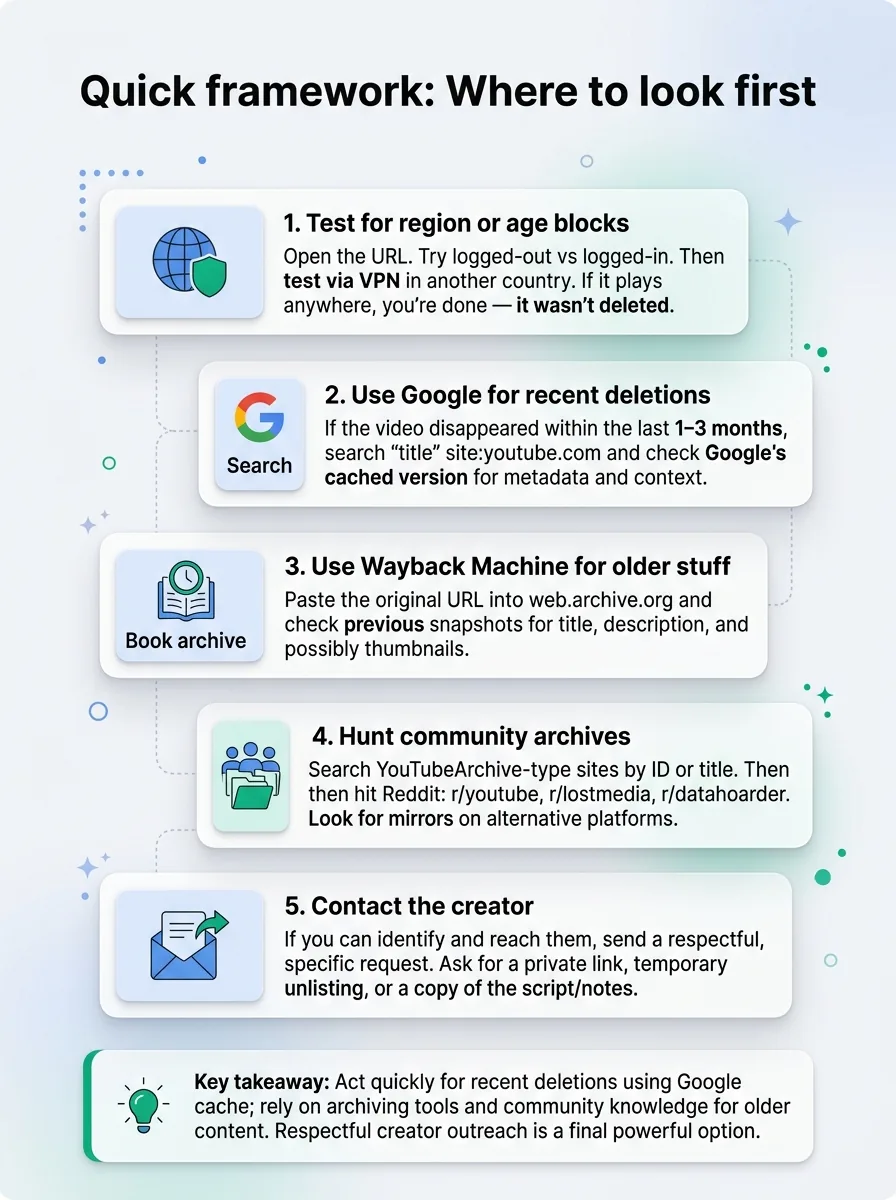
If you just want a straight, screenshot-able process for how to find deleted YouTube videos, use this:
Test for region or age blocks
Open the URL. Try logged-out vs logged-in. Then test via VPN in another country. If it plays anywhere, you’re done — it wasn’t deleted.Use Google for recent deletions
If the video disappeared within the last 1–3 months, search"title" site:youtube.comand check Google’s cached version for metadata and context.Use Wayback Machine for older stuff
Paste the original URL into web.archive.org and check previous snapshots for title, description, and possibly thumbnails.Hunt community archives
Search YouTubeArchive-type sites by ID or title. Then hit Reddit: r/youtube, r/lostmedia, r/datahoarder. Look for mirrors on alternative platforms.Contact the creator
If you can identify and reach them, send a respectful, specific request. Ask for a private link, temporary unlisting, or a copy of the script/notes.
Ready to save 15+ hours every week?
Join other creators who've automated their social media with SocialCal.
Get started freeFrequently asked questions
Can I recover a video I deleted from my own channel?
Not from YouTube itself. Once you delete an upload, YouTube doesn’t offer a “restore” button. Your only options are: a local backup (raw file on your drive), a download you grabbed earlier, or copies from archive sites or fans. Going forward, back up everything and consider using a content library system like SocialCal’s Content Library to keep your main assets organized.
Why does Wayback Machine not have the actual YouTube videos?
Because YouTube serves video via dynamic streaming, not as simple static files that web crawlers can easily copy. Wayback mostly saves HTML and some media files, not complex streaming sessions. So you’ll usually get the watch page — title, description, comments — but not a playable video.
How long does Google cache YouTube pages?
It varies, but for big sites like YouTube, the cache tends to roll over roughly every 30–90 days. That means Google cache is great for recent removals and almost useless for videos that vanished years ago. If the cached page already shows “Video unavailable,” that version has overwritten the old one.
Are deleted-YouTube-videos sites legal?
The legality depends on what they store and how they serve it. Archiving metadata and thumbnails is generally fine. Hosting full copyrighted videos without permission is where it gets murky. As a viewer, you’re rarely the legal target — but you should still avoid shady sites that ask for logins or push malware-like ads.
Can I re-upload a deleted video to my own channel?
If you are the original creator and you own all rights, yes — you can re-upload a deleted video. But treat it like a fresh upload: new URL, new stats, new algorithm run. If the video was removed due to copyright or policy strikes, re-uploading the same thing will likely trigger the same problems again.
The principle: most "deleted" videos exist somewhere
The internet has a long memory. YouTube might remove a video, but between caches, archives, mirrors, fan uploads, and creator hard drives, most “deleted” videos still exist somewhere. The real skill isn’t magic recovery — it’s knowing where to look and when to stop searching.
As a viewer, that saves you hours. As a creator, backing up your own work and cross-posting with tools like SocialCal’s Content Calendar means your content doesn’t live or die based on a single “Video unavailable” screen. Growth isn’t about perfection; it’s about making sure your work survives long enough to actually reach people.